
Estimate how much usable backup capacity a server may need after full backups, incremental chains, retention, compound data growth and free-space reserve are included. The planner starts with protected data in TB, models individual backup files in GB and recommends a practical usable-capacity target for the forecast period.
A 2 TB database does not necessarily create a 2,000 GB backup. If a tested full backup is 30% of the source, it may occupy about 600 GB, while an incremental at 2% may use about 40 GB. The TB-to-GB conversion establishes the scale, but the retained backup chain and its future growth determine the capacity that must actually be planned.
Understanding the TB to GB Conversion
GB = TB × 1,000
So 1 TB = 1,000 GB and 2 TB = 2,000 GB. These are the decimal units that drive makers and most storage arrays use. Backup software, operating systems and some appliances instead report binary units, where a gibibyte (GiB) is 1,073,741,824 bytes and a tebibyte (TiB) is 1,024 GiB. The same 2 TB database therefore appears as 1,862.65 GiB, or 1.819 TiB, in a binary report. The figures from this page's example look like this in each system:
| Item | Decimal | Binary GiB | Binary TiB |
|---|---|---|---|
| Protected database | 2,000 GB | 1,862.65 GiB | 1.819 TiB |
| One full backup | 600 GB | 558.79 GiB | 0.546 TiB |
| One incremental backup | 40 GB | 37.25 GiB | 0.036 TiB |
| Whole retained set, before growth | 3,360 GB | 3,129.24 GiB | 3.056 TiB |
Confirm which units a backup report, appliance or storage array uses before comparing it with an estimate, because the gap is about 7% at gigabyte scale and grows to about 10% at terabyte scale. NIST's guide to binary prefixes explains the names. The reverse conversion is on the GB to TB page.
Common Backup and Storage Capacities in TB and GB
| Terabytes | Gigabytes |
|---|---|
| 0.5 TB | 500 GB |
| 1 TB | 1,000 GB |
| 1.5 TB | 1,500 GB |
| 2 TB | 2,000 GB |
| 2.5 TB | 2,500 GB |
| 3 TB | 3,000 GB |
| 4 TB | 4,000 GB |
| 5 TB | 5,000 GB |
| 8 TB | 8,000 GB |
| 10 TB | 10,000 GB |
| 16 TB | 16,000 GB |
| 20 TB | 20,000 GB |
Why a 2 TB Database Might Produce a 600 GB Backup
Production allocation, used database blocks and backup-file size are three different measurements. A 2 TB database allocation may contain space that has never held data. Oracle's RMAN documentation describes two examples: unused block compression, where RMAN skips reading and backing up any database blocks not currently allocated to an object, and null block compression, where it omits any block that has never contained data. Binary compression of the blocks that are written is a separate step.
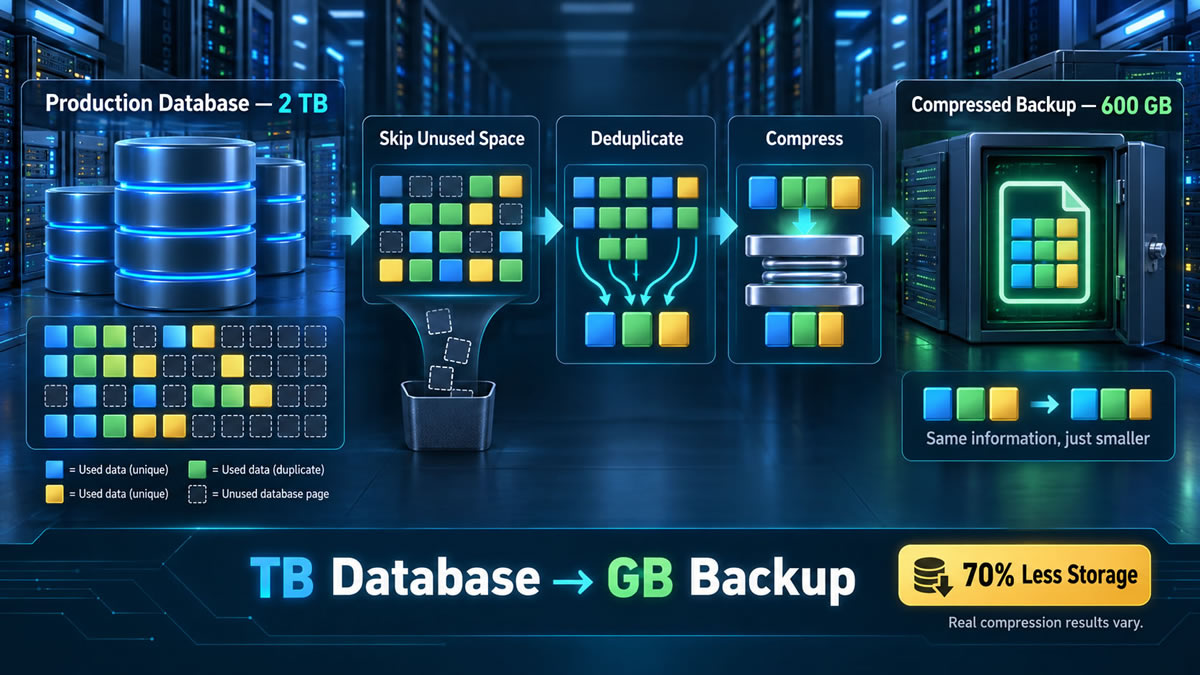
If the 2 TB allocation is treated as 2,000 GB and the backup is 600 GB, the backup is 30% of the source, which is a ratio of about 3.33 to 1 and a saving of 70%. Compression results are often quoted as ratios and planned as percentages, so the table converts between them:
| Ratio | Backup size | Saving | Note |
|---|---|---|---|
| 1.5:1 | 66.7% of source | 33.3% | |
| 2:1 | 50% of source | 50% | |
| 3:1 | 33.3% of source | 66.7% | Microsoft's example: about 66% saved |
| 3.33:1 | 30% of source | 70% | The 2 TB to 600 GB example |
| 5:1 | 20% of source | 80% | |
| 10:1 | 10% of source | 90% |
The reduction can be legitimate, but it is not a universal ratio. Microsoft's SQL Server documentation says the compression ratio of a backup depends on the data, that character data compresses more than other types, and that encrypted data compresses significantly less than the same data unencrypted. Repeated structured data may shrink more and encrypted or already compressed content much less.
Incremental backups add another scale. A 2 TB database might change by 40 GB in a day, so an incremental can be much smaller than a new full backup. Oracle's documentation notes that incremental backups capture changes block by block and are generally smaller than a full backup unless every block has changed. The retention policy must still keep the base backup and every dependent recovery component.
Plan Backup Retention, Growth and Required Capacity
Enter the current protected-data size and ratios observed or expected for full and incremental backups. Build the schedule from retention days, full-backup frequency and incrementals per non-full day, then add the forecast period, reserve and backup locations. The planner can calculate either the capacity required by that policy or the retention supported by the capacities already available.
Estimated Backup Capacity Plan
Month-by-Month Capacity Timeline
Capacity by Backup Location
| Location | Copies | Required | Available | Status |
|---|
This is a capacity model, not a recovery guarantee. Confirm schedules, compression, deduplication, immutability, replication behaviour and restore dependencies with the backup product, then test restores using the retained chains.
How the Backup Planner Works
Each workload grows independently across the selected forecast period. The schedule converts retention days into a retained number of full backups and incrementals, and the workload-specific size ratios are applied to its forecast source data. For a conservative steady-state estimate, every retained backup is treated as though it were created at the forecast size. Each backup location then receives its chosen number of equivalent copies, and the reserve is kept free by dividing the retained set by the usable share of capacity. In reverse mode, the planner searches for the longest whole-day retention period that fits every location.
Example Retention Policy Before Growth
| Backup component | Assumption | Estimated size |
|---|---|---|
| One full backup | 30% of 2 TB | 600 GB |
| One incremental backup | 2% of 2 TB | 40 GB |
| Four retained full backups | 4 × 600 GB | 2,400 GB |
| Six incrementals per full | 24 × 40 GB | 960 GB |
| Total before growth or reserve | 2,400 GB + 960 GB | 3,360 GB = 3.36 TB |
Current Default Workloads, Locations and Forecast
| Step | Result | How |
|---|---|---|
| Forecast protected data | About 9.19 TB | 2 TB database at 3% monthly growth plus 5 TB file server at 2% |
| Schedule retained | 4 fulls and 24 incrementals | 28 days, a full every 7 days and one incremental on each non-full day |
| Database retention set | About 4.79 TB | 30% fulls and 2% incrementals |
| File-server retention set | About 19.28 TB | 70% fulls and 1% incrementals |
| One-copy retention set | About 24.07 TB | Database plus file-server backup chains |
| Required at each location | About 30.08 TB | 24.07 TB ÷ 80% usable share |
| Two backup locations | About 60.17 TB total | One equivalent copy at each location |
The example shows why one average ratio is often insufficient: the file server contributes much more to the retained set than the database, and the same chain must fit independently at both backup locations.
Retention, Restore Chains and Recovery Testing
Full and Incremental Backups Serve Different Roles
A full backup establishes a recovery base and incrementals record changes according to the product's strategy. Incrementals reduce routine storage and transfer, but recovery may depend on the correct full backup and every required link in its chain.
Compression and Deduplication Are Separate
Compression encodes patterns more efficiently within backup data, while deduplication stores identical chunks once. An environment can use either technique, both or neither, so take ratios from reports on your own workload rather than a generic figure.
Capacity Does Not Prove Recoverability
A small, successful-looking backup file does not prove an application can be restored. NIST's National Cybersecurity Center of Excellence guide on protecting data from ransomware and other data loss events, written for managed service providers, recommends conducting, maintaining and testing backup files. It advises keeping some backups offline, keeping copies of credentials and encryption keys, setting a recovery time objective, and monitoring backup processes for failures. Run realistic recovery exercises and treat the capacity figure as only one input.
Server Backup Capacity Questions
Sources and Related Converters
- Oracle: RMAN backup concepts: unused block compression, null block compression and binary compression of backup sets.
- Microsoft: backup compression (SQL Server): how the compression ratio depends on the data and on encryption.
- NIST NCCoE: Protecting data from ransomware and other data loss events: conducting, maintaining and testing backup files.
- NIST: prefixes for binary multiples: gibibyte, tebibyte and the decimal and binary meanings of the prefixes.
The conversions, the example policy and the planner are UnitConversionPlus's own arithmetic. The compression ratios and change rates are illustrations, so use measured figures from your own backup reports. This page is general planning information, not advice on a particular system. Figures on this page are checked against the sources listed. Spotted an error? Contact us.