Estimate how much storage a surveillance system may need from its number of cameras, configured bitrate, daily recording schedule, motion activity and retention period. The planner reports daily storage in GB, converts the full archive to TB, adds a safety reserve and estimates how many selected storage units are required.
For example, eight cameras averaging 2 Mbps and recording continuously generate about 172.8 GB per day. Thirty days of footage uses approximately 5.184 TB before reserve, recorder overhead or RAID protection is considered. The estimator makes that GB-to-TB progression visible while allowing the assumptions to be changed for a particular system.
Understanding the GB to TB Conversion
TB = GB ÷ 1,000
So 1,000 GB = 1 TB and 1 GB = 0.001 TB. For example, 5,184 GB ÷ 1,000 = 5.184 TB. Drive makers use these decimal units. Seagate and SanDisk both state in their storage calculators that one gigabyte is one billion bytes and one terabyte is one trillion bytes. Seagate adds that an operating system may use a different standard and report a lower capacity, and SanDisk notes that accessible capacity can vary with the operating environment.
That different standard is binary. Windows, for example, divides by 1,073,741,824 bytes per gibibyte (GiB) but labels the result "GB". The table shows what that does to the capacity on a drive's label:
| Label | Bytes | Shown in binary units | Apparent shortfall |
|---|---|---|---|
| 0.5 TB | 500,000,000,000 | 465.66 GiB | 34.34 GB |
| 1 TB | 1,000,000,000,000 | 931.32 GiB | 68.68 GB |
| 2 TB | 2,000,000,000,000 | 1,862.65 GiB | 137.35 GB |
| 4 TB | 4,000,000,000,000 | 3,725.29 GiB | 274.71 GB |
| 8 TB | 8,000,000,000,000 | 7,450.58 GiB | 549.42 GB |
| 16 TB | 16,000,000,000,000 | 14,901.16 GiB | 1,098.84 GB |
The shortfall is a difference in counting, not lost space. Some capacity is also used for formatting and other functions, so the usable amount is slightly lower still, and RAID arrays give less than the total of their drive labels. NIST's guide to binary prefixes explains the unit names.
Common Storage Capacities in GB and TB
| Gigabytes | Terabytes |
|---|---|
| 1 GB | 0.001 TB |
| 5 GB | 0.005 TB |
| 10 GB | 0.01 TB |
| 25 GB | 0.025 TB |
| 50 GB | 0.05 TB |
| 100 GB | 0.1 TB |
| 250 GB | 0.25 TB |
| 500 GB | 0.5 TB |
| 750 GB | 0.75 TB |
| 1,000 GB | 1 TB |
| 1,500 GB | 1.5 TB |
| 2,000 GB | 2 TB |
| 5,000 GB | 5 TB |
| 10,000 GB | 10 TB |
When Daily Security Video Grows from GB to TB
Video storage follows from one constant. A stream of 1 megabit per second, recorded continuously for 24 hours, is 1,000,000 ÷ 8 × 86,400 bytes, which is 10.8 GB. Every extra megabit per second adds 10.8 GB a day, so a camera's daily storage is its bitrate times 10.8. Note that Mbps means megabits per second, not megabytes, a mix-up that makes a result eight times too big.
| Average bitrate | Storage per day | Storage for 30 days | 30 days in TB |
|---|---|---|---|
| 1 Mbps | 10.8 GB | 324 GB | 0.324 TB |
| 2 Mbps | 21.6 GB | 648 GB | 0.648 TB |
| 4 Mbps | 43.2 GB | 1,296 GB | 1.296 TB |
| 8 Mbps | 86.4 GB | 2,592 GB | 2.592 TB |
| 16 Mbps | 172.8 GB | 5,184 GB | 5.184 TB |
Now take a small site with eight cameras, each averaging 2 Mbps and recording continuously. The system generates about 172.8 GB each day. Keeping 30 days of footage makes the raw archive 5,184 GB, or 5.184 TB. The daily figure is convenient in gigabytes, but the retention total is easier to compare with drives in terabytes. A 10% planning reserve raises the requirement to about 5.70 TB, so a 6 TB usable-capacity target is a more practical starting point than exactly 5.184 TB. The 2 Mbps figure is an illustration, and real cameras often run higher.
Real footage does not arrive at a perfectly constant rate. Movement, night noise, rain, detailed scenes, quality settings and variable-bitrate encoding all change the amount recorded, so treat the estimate as a planning figure and check it against the bitrate your cameras or recorder actually report.
Retention Is a Decision, Not Just a Disk Size
In the UK, footage showing identifiable people is personal data under data protection law. The ICO's approach, as commonly summarised, is that there is no fixed retention period: footage should be kept for no longer than is necessary for the purpose you recorded it for. The 30 days used here is therefore a planning assumption, not a legal requirement, and a larger archive is not automatically better. Decide the retention period for your own purpose, write it down, and then size the storage to match. See the ICO's video surveillance guidance.
Estimate Security Camera Storage and Drive Requirements
Enter the average configured bitrate for one camera, then describe the number of cameras, recording hours, expected active time and retention period. The estimator combines those assumptions, converts the accumulating archive from GB to TB, applies a planning reserve and shows both the selected storage-unit count and the approximate retention available from one unit. Results update as the inputs change.
Estimated Surveillance Storage Plan
Capacity Allocation by Camera Group
RAID figures are simplified capacity estimates based on equal-sized drives. Actual usable space can be lower because of formatting, filesystem overhead, recorder-reserved space, hot spares, controller rules and manufacturer-specific capacity reporting.
How the Video Storage Estimate Works
The estimator multiplies the per-camera bitrate by the number of cameras to get the combined stream rate. It then applies the effective recording time, converts bits to bytes, and totals the result over the retention period, showing the raw result in decimal GB and TB. The reserve is added after the raw total. It gives headroom for bitrate variation and planning uncertainty, but it is not a replacement for a proper RAID or storage-system design. If a RAID array provides less usable capacity than its raw drive total, enter the array's usable TB rather than adding the labels on its drives.
Worked Example: Eight Cameras for 30 Days
| Planning step | Result |
|---|---|
| Combined bitrate | 16 Mbps |
| Footage generated per day | 172.8 GB |
| Raw storage for 30 days | 5,184 GB = 5.184 TB |
| Requirement with 10% reserve | 5,702.4 GB = 5.7024 TB |
| 6 TB storage units required | 1, assuming 6 TB is usable capacity |
| Days one 6 TB unit holds, with reserve | 31 (6,000 ÷ 1.1 ÷ 172.8 = 31.6) |
What Changes Security-Video Storage Use?
| Factor | Why it matters |
|---|---|
| Configured bitrate | The most direct indicator of how much data a stream produces over time. |
| Resolution | More pixels can require a higher bitrate to preserve comparable detail. |
| Frame rate | More frames per second usually increase the amount of visual information encoded. |
| Compression codec | H.264, H.265 and other codecs can produce different bitrates for similar perceived quality. |
| Scene complexity | Movement, foliage, rain, noise and changing light can make footage harder to compress. |
| Recording mode | Motion-triggered recording may use less storage than continuous recording, but activity varies by site. |
| Audio | An audio stream adds data and should be included when the camera records sound. |
| Retention period | Doubling the number of retained days approximately doubles the required footage storage. |
This page uses a simple bitrate-led calculation so you can enter a value from your own camera or recorder. Vendor tools work from different inputs. Seagate's surveillance storage calculator asks for the number of cameras, picture size and quality, compression, frame rate, retention days, daily recording hours and motion recording, then covers redundancy and scalability, and SanDisk's surveillance capacity estimator works from video format, quality and scene activity. Compare the answers when sizing a system.
How SSD Capacity Grew from Megabytes to Terabytes
SSDs store data in non-volatile semiconductor memory instead of spinning magnetic platters. Consumer SSDs commonly come in capacities such as 256 GB, 512 GB, 1 TB, 2 TB, 4 TB and 8 TB. A 512 GB drive is 0.512 TB, and a 4 TB model is 4,000 decimal GB.
Solid-state storage began long before modern NAND flash. The Computer History Museum records the StorageTek STC 4305, an enterprise SSD introduced in 1978 that stored 45 MB for $400,000. It used volatile RAM chips backed up by batteries and hard drives to keep data when power was removed, not the NAND flash in present-day SSDs. Converting that price up the unit ladder shows the change:
| Drive | Capacity | In GB | In TB | Note |
|---|---|---|---|---|
| StorageTek STC 4305 (1978) | 45 MB | 0.045 GB | 0.000045 TB | $400,000, about $8,888,888,889 per TB in 1978 dollars |
| Consumer SSD | 512 GB | 512 GB | 0.512 TB | Photographed below |
| Consumer SSD | 2 TB | 2,000 GB | 2 TB | Photographed below |
| Micron 6600 ION (2026) | 245.76 TB | 245,760 GB | 245.76 TB | Data-centre drive, shipping from May 2026 |
The Micron 6600 ION family, built on QLC NAND, offers 30.72, 61.44, 122.88 and 245.76 TB models in E3 and U.2 form factors, and the 245.76 TB model began shipping in May 2026. It holds about 5,461,333 times the STC 4305's capacity and 480 times a 512 GB consumer drive. Such drives are made for dense server storage, and they show how a capacity once discussed in megabytes now reaches hundreds of terabytes in specialised equipment.
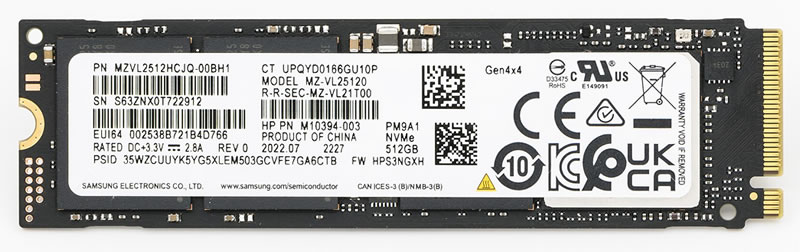
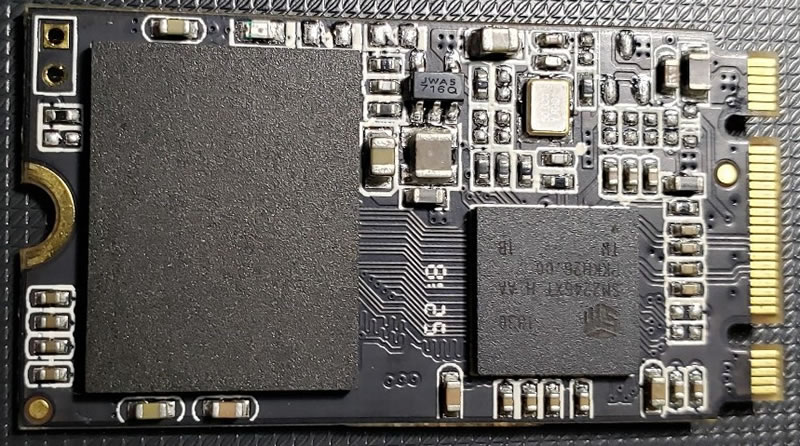
Capacity is only one consideration. An SSD's interface, endurance, performance, cooling needs and suitability for the workload also matter, and neither an SSD nor a hard drive replaces a separate, tested backup.
Sources and Related Converters
- Seagate: video storage calculator for surveillance and SanDisk: surveillance capacity estimator: the decimal definitions of GB and TB, the notes on reported capacity, and the inputs vendors use.
- Computer History Museum: 1991, solid state drive module demonstrated: the 1978 STC 4305, 45 MB for $400,000.
- StorageReview: Micron 6600 ION 245TB review and ServeTheHome: Micron 6600 ION 245TB announced: the capacities, QLC NAND and May 2026 shipping date.
- ICO: video surveillance guidance: recording and retention under UK data protection law.
- NIST: prefixes for binary multiples: gibibyte, tebibyte and the decimal and binary meanings of the prefixes.
The tables, the 10.8 GB-per-Mbps constant and the estimator are UnitConversionPlus's own arithmetic. Figures on this page are checked against the sources listed. Spotted an error? Contact us.