
Use this seconds to milliseconds converter to multiply any value in seconds by 1,000. The practical example below shows how converting a 1.2-second server response into a 1,200-millisecond performance budget can reveal database, application and network delays—and help identify improvements that may reduce the response to approximately 200 milliseconds.
Second to Millisecond Conversion Formula
The conversion formula is:
1 s = 1,000 ms
Or simply:
s × 1,000 = ms
This conversion uses fixed seconds-based factors: 1 s = 1 s and 1 ms = 0.001 s.
Common Second to Millisecond Conversions
| Seconds | Milliseconds |
|---|---|
| 0.001 s | 1 ms |
| 0.005 s | 5 ms |
| 0.01 s | 10 ms |
| 0.02 s | 20 ms |
| 0.025 s | 25 ms |
| 0.05 s | 50 ms |
| 0.1 s | 100 ms |
| 0.2 s | 200 ms |
| 0.25 s | 250 ms |
| 0.5 s | 500 ms |
| 0.75 s | 750 ms |
| 1 s | 1,000 ms |
| 1.2 s | 1,200 ms |
| 1.5 s | 1,500 ms |
| 2 s | 2,000 ms |
| 2.5 s | 2,500 ms |
| 5 s | 5,000 ms |
| 10 s | 10,000 ms |
| 30 s | 30,000 ms |
| 60 s | 60,000 ms |
| 100 s | 100,000 ms |
| 1,000 s | 1,000,000 ms |
| 10,000 s | 10,000,000 ms |
To convert seconds to milliseconds, multiply the number of seconds by 1,000. For example, a 1.2-second web server response equals 1,200 milliseconds, while a 0.2-second response equals 200 milliseconds.
How to Improve Your Web Server Response from Over 1 Second to 200 ms
A web page can appear lightweight yet still feel slow if the browser waits more than a second for the server to begin responding. Images, scripts and stylesheets cannot start loading until the initial HTML arrives, so a slow first response affects everything that follows.
Server responsiveness is often measured using Time to First Byte (TTFB) — the time between requesting a resource and receiving the first byte of its response. TTFB includes network and connection delays as well as work performed by the application and database.
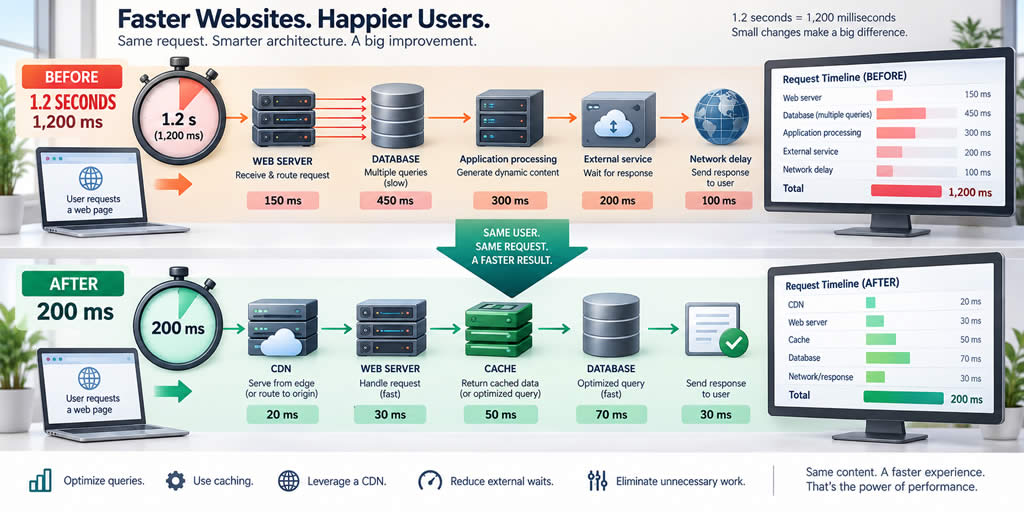
This fictional example shows how a development team reduced an uncached response from about 1.2 seconds to roughly 200 milliseconds. The numbers illustrate the process rather than guarantee a specific outcome, because every application, hosting environment and visitor location behaves differently.
Converting the Target into Milliseconds
Performance dashboards often show results in seconds, while server traces use milliseconds. A seconds to milliseconds converter makes the values easier to compare:
1 second = 1,000 milliseconds
To convert seconds to milliseconds, multiply the number of seconds by 1,000:
Milliseconds = seconds × 1,000
For the example website:
- 1.2 seconds = 1,200 ms
- 0.2 seconds = 200 ms
- Time removed = 1,000 ms
This represents an approximate 83% reduction in response time:
(1,200 − 200) ÷ 1,200 × 100 ≈ 83%
Step 1: Measure Before Changing Anything
The team began by measuring multiple requests rather than relying on a single fast or slow test. It compared:
- nearby and distant visitor locations
- cached and uncached responses
- anonymous and signed‑in pages
- quiet periods and busy traffic
- laboratory tests and real‑visitor data
This matters because TTFB is not the same as application processing time. DNS lookup, connection setup, TLS negotiation, redirects and geographic distance can add delay before or after the application begins its work.
Google's TTFB optimisation guidance describes 0.8 seconds or less as a rough target for most websites. It also notes that TTFB is not a Core Web Vitals metric and should be interpreted alongside how a site delivers content. A 200 ms response is therefore an ambitious goal, not a universal requirement.
Step 2: Break the Slow Request into Smaller Parts
Application tracing showed that the original 1,200 ms response was caused by several smaller delays rather than one large bottleneck:
| Request stage | Approximate time |
|---|---|
| Database queries | 520 ms |
| Application processing | 310 ms |
| Calling an external service | 180 ms |
| Template rendering and other work | 90 ms |
| Network and connection time | 100 ms |
| Total | 1,200 ms |
The priorities were clear: shaving a few milliseconds off template formatting would not matter while database operations consumed more than half a second.
Step 3: Remove Repeated Database Work
The page originally sent several similar database queries. Some columns were unused, and one query ran separately for every item displayed. The team combined related queries, selected only the required data and added an index matching a frequently used filter.
Query plans and production‑like data were checked before and after each change. Indexes can improve one query but add overhead to inserts and updates, so they must be tested rather than added automatically.
These improvements reduced the database portion of the request from 520 ms to about 75 ms.
Step 4: Cache Content That Does Not Need Rebuilding
The website generated the same public category page for many visitors. Instead of rebuilding it every time, the application cached the completed result for a short period.
HTTP caching also allows browsers, reverse proxies and CDNs to reuse eligible responses. The MDN Cache-Control reference explains how directives communicate whether and for how long a response may be stored.
Caching must be used carefully. Personalised pages must not be stored in shared caches. Public and private responses require correct cache rules, keys and invalidation behaviour.
Step 5: Avoid Waiting for Unnecessary External Requests
The server had been waiting for an external service before returning the page, even though the information was not needed in the initial HTML. The team moved this non‑essential work out of the critical path and used a short timeout with a safe fallback.
Essential external calls were retained but cached where appropriate and monitored for slow responses, errors and timeouts.
Step 6: Serve Cacheable Content Closer to Visitors
Visitors far from the origin server experienced additional network delay. A content delivery network placed reusable files and selected public responses closer to users.
On a cache hit, the edge location can respond without contacting the origin server. This reduces latency and decreases load on the origin, as explained in Cloudflare's caching documentation .
Not all responses should be cached. Signed‑in, rapidly changing or personalised content may still need to reach the application server.
Step 7: Remove Unnecessary Redirects
Redirects add another request‑response cycle. The team updated internal links so visitors reached the preferred HTTPS address directly instead of passing through an older URL.
Redirects remain useful when URLs change or traffic must be sent to a canonical address. The goal is simply to avoid unnecessary chains.
Step 8: Check Server Capacity Under Load
The team monitored CPU usage, memory, database connections, request queues and available workers. A page that responds in 200 ms during a quiet test may slow dramatically when every worker is busy.
Load testing confirmed that the improvement held under realistic traffic. Tests were performed safely and without disrupting production users.
The New Response-Time Budget
| Request stage | Approximate time |
|---|---|
| Optimised database work | 75 ms |
| Application processing | 45 ms |
| Required service and cache work | 20 ms |
| Template rendering and other work | 20 ms |
| Network and connection time | 40 ms |
| Total | 200 ms |
The improvement did not come from one setting. It resulted from measuring the request, removing repeated database work, caching suitable responses, shortening the critical path, reducing network distance and verifying that the server had enough capacity.
Monitor Results After Deployment
The team continued monitoring the application after releasing the changes. It checked average results as well as slower percentile values, because averages can hide poor experiences affecting some visitors.
Error rates were monitored alongside speed. A fast but incomplete response is not a successful improvement. Correctness, security and reliability remain more important than hitting an arbitrary timing target.
Response Time Is Only the Beginning
A 200 ms initial response does not guarantee that the full page feels fast. The browser may still need to download images, execute JavaScript, calculate layout and render content.
TTFB should be monitored alongside user‑facing metrics such as First Contentful Paint and Largest Contentful Paint. A server‑rendered page with a slightly slower TTFB may display useful content sooner than a page that returns a small document quickly but relies heavily on client‑side processing.
The key lesson is not that every server must reach exactly 200 ms. It is that a delay described as "just over one second" becomes easier to investigate when converted into a millisecond budget. Once each stage has a measured cost, the team can improve the work that matters most and verify whether real visitors benefit.