Convert milliseconds to microseconds when comparing storage latency, electronic response times and other high-speed operations. This milliseconds to microseconds converter multiplies the millisecond value by 1,000 and displays the result instantly. Explore the conversion formula, common values and the real-life difference between a mechanical hard drive responding in milliseconds and an SSD responding in microseconds.
Millisecond to Microsecond Conversion Formula
The conversion formula is:
1 ms = 1,000 µs
Or simply:
ms × 1,000 = µs
This conversion uses fixed seconds-based factors: 1 ms = 0.001 s and 1 µs = 0.000001 s.
Millisecond to Microsecond Conversion Table
| Milliseconds (ms) | Microseconds (µs) |
|---|---|
| 1 ms | 1,000 µs |
| 5 ms | 5,000 µs |
| 10 ms | 10,000 µs |
| 50 ms | 50,000 µs |
| 100 ms | 100,000 µs |
| 500 ms | 500,000 µs |
| 1,000 ms | 1,000,000 µs |
| 5,000 ms | 5,000,000 µs |
| 10,000 ms | 10,000,000 µs |
To convert milliseconds to microseconds, multiply the number of milliseconds by 1,000. One millisecond contains exactly 1,000 microseconds.
From 600 Milliseconds to Under 100 Microseconds: Seven Decades of Storage
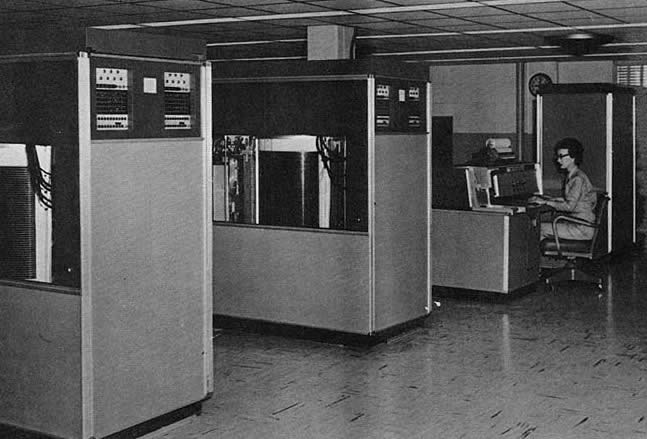
The gap between millisecond and microsecond storage latency isn't just a modern comparison — it maps almost exactly onto the real history of data storage. In September 1956, IBM announced the 350 RAMAC (Random Access Method of Accounting and Control), the world's first commercial computer disk drive. It held 50 spinning 24-inch platters, weighed roughly a ton, occupied about the same footprint as two refrigerators, and stored 3.75 megabytes of usable data.
Its average access time — the delay between a request and the data becoming available — was 600 milliseconds. Converted into microseconds, using the same formula as the rest of this page:
600 ms × 1,000 = 600,000 µs
A modern SSD responding in well under 100 microseconds is therefore performing the same kind of task thousands of times faster than the device that launched commercial disk storage nearly seventy years earlier. The RAMAC's 600-millisecond figure reflected real mechanical movement: an access arm physically travelling across the platters to find the right track. The microsecond-scale responses possible today come from having removed that physical movement from the process entirely — exactly the shift described in the comparison below.
From Milliseconds to Microseconds: Why an SSD Feels Faster Than a Hard Drive
Two computers can use the same processor and run the same operating system yet feel noticeably different when starting applications, searching files or loading a game. The storage device is often one reason. A mechanical hard disk drive must physically move parts to reach stored data, while a solid-state drive retrieves information electronically.
The difference is commonly discussed using two very small time units. Mechanical-drive access is often measured in milliseconds, while some solid-state storage operations can be measured in microseconds.
How a Mechanical Hard Drive Finds a File
A hard disk drive stores information magnetically on rotating platters. When the computer requests data, an actuator moves a read-and-write head towards the correct track. The drive must then wait for the required part of the platter to rotate beneath the head.
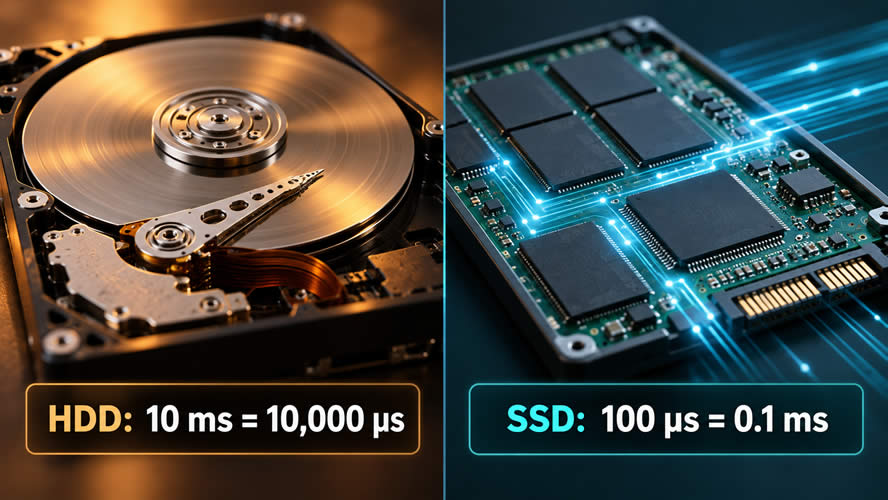
These mechanical movements take time. Suppose a particular request requires 10 milliseconds before the drive can begin returning the requested data. To compare that delay with an SSD value expressed in microseconds, convert milliseconds to microseconds :
10 ms × 1,000 = 10,000 µs
Ten milliseconds may sound insignificant, but the drive might need to perform many separate operations while an application is opening. When files are scattered across different physical locations, repeated head movement and rotational waiting can add to the total loading time.
How an SSD Removes the Mechanical Wait
A solid-state drive stores data in flash memory and has no spinning platters or moving read head. Its controller can access stored information electronically. This generally allows an SSD to respond to many requests in a fraction of the time required by a mechanical drive.
Imagine that an SSD completes a comparable storage request in 100 microseconds. Expressed in milliseconds, that is:
100 µs ÷ 1,000 = 0.1 ms
In this simplified comparison, the hard drive takes 10 ms, or 10,000 µs, while the SSD takes 100 µs, or 0.1 ms. The SSD's response is 100 times shorter:
10,000 µs ÷ 100 µs = 100
These figures are illustrative rather than universal benchmarks. Actual latency varies with the drive, interface, controller, request type, queue depth, data location and workload.
Why Small Delays Affect Everyday Computing
Loading one large sequential file is different from retrieving thousands of small files. Starting an operating system or application can require many separate requests for program files, settings, libraries, icons and user data. A small delay repeated across numerous requests can become a noticeable wait.
Lower storage latency can improve tasks such as:
- Starting the computer and signing in
- Opening applications and large projects
- Loading game levels and installed assets
- Searching folders or indexing files
- Reading database records
- Working with virtual machines
- Installing software and applying updates
An SSD does not make every operation equally faster. Tasks limited by processor performance, network speed or graphics hardware may show little improvement. However, workloads that repeatedly wait for storage can benefit substantially from lower access latency.
Using the Same Unit for a Fair Comparison
Comparing 10 milliseconds with 100 microseconds is difficult until both values use the same unit. A milliseconds to microseconds converter makes the scale difference easier to see:
- 0.1 ms = 100 µs
- 0.5 ms = 500 µs
- 1 ms = 1,000 µs
- 5 ms = 5,000 µs
- 10 ms = 10,000 µs
The conversion formula is:
Microseconds = milliseconds × 1,000
Changing the unit does not alter the measured performance. It simply expresses both delays on a common scale so that their difference is easier to calculate and explain.
Latency Is Only Part of Storage Performance
Response time is important, but it is not the only storage characteristic. Sequential transfer speed describes how quickly large, continuous files can be moved. Input/output operations per second indicate how many requests a drive can process, while endurance, capacity, power consumption and cost also influence which device is appropriate.
A mechanical hard drive can still be practical for storing large archives, backups and media collections where capacity and price are more important than rapid access. An SSD is often preferred for the operating system, applications and active projects where lower latency improves responsiveness.
The change from milliseconds to microseconds tells the central story: replacing physical movement with electronic access can greatly reduce the time spent waiting for data. Each saved interval is tiny, but across thousands of storage requests, those microseconds help make a computer feel faster.