
A single 20 TB hard drive is already close to the physical limit of what one disk can hold — so how does a data centre reach a petabyte? Not with one enormous drive, but by combining hundreds of ordinary ones, coordinated by software that decides where every piece of data actually lives. Use the converter above for an instant TB-to-PB result, or the formula and chart below to work it out by hand.
Terabyte to Petabyte Conversion Formula
This converter uses decimal data units. The prefix tera represents 1012, while peta represents 1015.
The conversion relationship is:
1 TB = 0.001 PB
To convert terabytes to petabytes, divide by 1,000:
Petabytes = Terabytes ÷ 1,000
You can also multiply the terabyte value by 0.001:
PB = TB × 0.001
Example: Convert 2,500 TB to PB
2,500 TB ÷ 1,000 = 2.5 PB
This calculation uses the following decimal byte-based definitions:
- 1 TB = 1,000,000,000,000 bytes
- 1 PB = 1,000,000,000,000,000 bytes
The decimal meanings of the prefixes tera and peta follow the NIST definitions of metric prefixes . NIST also explains the difference between decimal storage units and binary units in its guide to binary prefixes .
This converter uses TB and PB, not the binary units TiB and PiB. In binary measurement, 1 PiB equals 1,024 TiB.
Terabyte to Petabyte Table
| TB | PB |
|---|---|
| 1 TB | 0.001 PB |
| 5 TB | 0.005 PB |
| 10 TB | 0.01 PB |
| 25 TB | 0.025 PB |
| 50 TB | 0.05 PB |
| 100 TB | 0.1 PB |
| 250 TB | 0.25 PB |
| 500 TB | 0.5 PB |
| 750 TB | 0.75 PB |
| 1,000 TB | 1 PB |
| 2,000 TB | 2 PB |
| 5,000 TB | 5 PB |
| 10,000 TB | 10 PB |
| 25,000 TB | 25 PB |
| 50,000 TB | 50 PB |
| 100,000 TB | 100 PB |
How Hundreds of TB Drives Become Petabytes of Data-Centre Storage
A petabyte may sound like the capacity of one enormous storage device, but data centres normally reach this scale by combining many smaller drives. Drives are installed in storage servers, servers are mounted in racks, and software coordinates the resulting hardware as one or more storage pools.
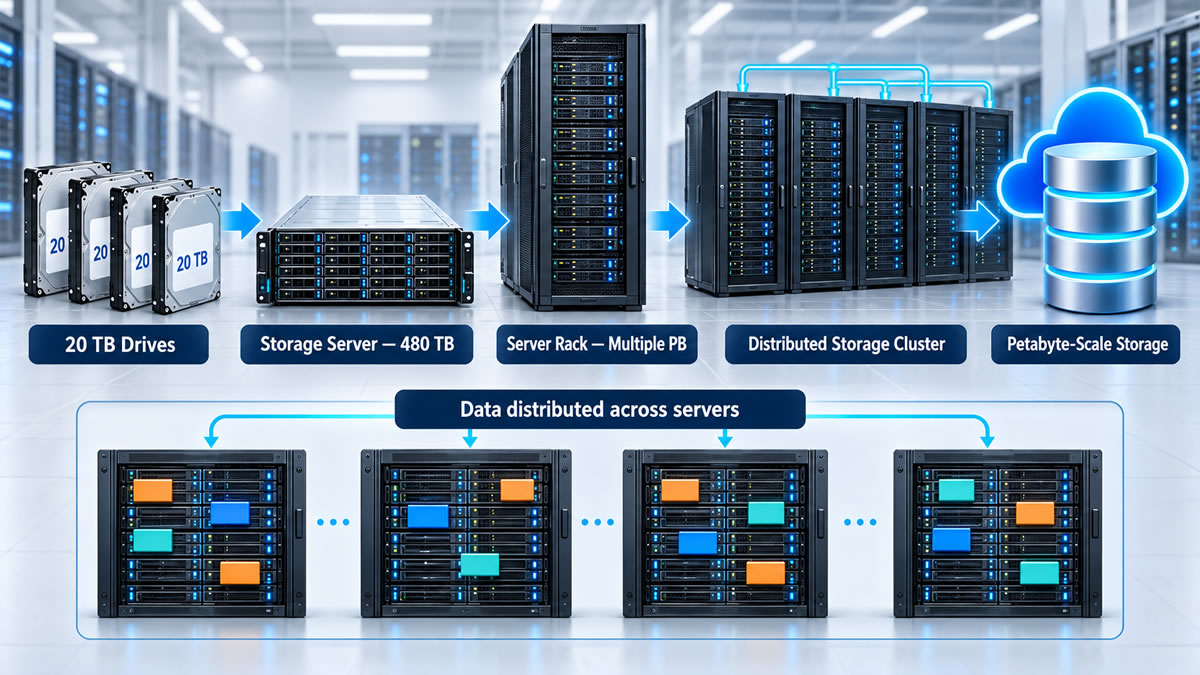
The Capacity Begins with Individual Drives
A storage server, sometimes called a storage node, may contain numerous hard disk drives, solid-state drives or a mixture of both. Hard drives are often used when economical high capacity is important, while SSDs may be selected for workloads requiring lower latency or faster access.
Consider an illustrative server containing twenty-four drives, each advertised as 20 TB. Its total raw drive capacity would be:
24 × 20 TB = 480 TB
Three identically configured servers would contain:
3 × 480 TB = 1,440 TB = 1.44 PB of raw capacity
The word raw is important. It describes the sum of the advertised drive capacities before accounting for data protection, filesystems, metadata, spare space and operational reserves.
Raw Capacity Is Not Usable Capacity
Storage operators generally avoid keeping the only copy of important information on one drive. Hardware can fail, so storage systems retain additional copies or recovery information to keep data available and rebuild missing content.
Common protection methods include:
- Mirroring — storing two or more complete copies of the same data.
- Parity-based RAID — distributing data and recovery information across drives in an array.
- Distributed replication — keeping replicas on different storage nodes or failure domains.
- Erasure coding — dividing information into data fragments and adding recovery fragments.
- Operational reserves — leaving space available for rebuilding, maintenance and data rebalancing.
These approaches offer different trade-offs among capacity efficiency, performance, cost and fault tolerance. Redundancy can improve availability, but it is not automatically a substitute for an independently managed backup and tested recovery procedure.
Suppose a cluster contains 2 PB of raw drive capacity and stores three complete copies of each object. Before accounting for other overhead, its theoretical data capacity would be approximately:
2 PB ÷ 3 ≈ 0.667 PB
An erasure-coded system might retain a different proportion of its raw capacity, depending on the selected number of data and recovery fragments. Metadata, partially filled drives and reserved rebuilding space can reduce the immediately usable amount further.
Storage specifications may therefore distinguish between:
- Raw capacity — the sum of the capacities printed on the installed drives.
- Usable capacity — the space remaining after data protection and system overhead.
- Available capacity — usable space that has not yet been occupied or reserved.
- Effective capacity — an estimate that may include expected savings from compression or deduplication.
Effective-capacity estimates require context because compression and deduplication results depend on the stored data. Files that are already compressed or encrypted may offer much smaller savings than repetitive, uncompressed datasets.
Distributed Software Places the Data
At petabyte scale, relying on one server would create capacity, performance and reliability limitations. Distributed storage systems instead spread data across numerous drives and storage nodes.
A file-based system may divide files into blocks, while an object-storage platform manages data as objects. Placement methods vary by platform. The Ceph architecture documentation , for example, describes how Ceph uses the CRUSH algorithm to determine data placement across storage devices, organising stored objects through placement groups, as explained in its placement-group documentation . Other distributed storage systems may locate and protect data using different designs.
Distribution Supports Capacity and Recovery
Distributing data lets storage requests use many drives and network connections instead of forcing all activity through one machine. It can also prevent the loss of one drive from making an entire dataset unavailable.
Protection may be planned around failure domains. Copies or recovery fragments can be placed on separate drives, nodes, racks or facilities so that one hardware or power failure is less likely to remove every protected copy. When a drive fails, the system may reconstruct its missing information on healthy drives — rebuilding consumes disk and network resources, and the data may have reduced protection until the required redundancy has been restored.
Scaling from 100 Drives to 1,000 Drives
One hundred 20 TB drives provide:
100 × 20 TB = 2,000 TB = 2 PB
An installation containing 1,000 drives of the same advertised capacity would contain:
1,000 × 20 TB = 20,000 TB = 20 PB
These figures describe raw capacity. The amount available to applications would be lower after redundancy, metadata, spare capacity and operational reserves are included.
Petabyte-scale storage is therefore not created by finding one petabyte-sized drive. It emerges from combining TB drives with servers, networking, protection policies and software that places, retrieves, monitors and rebuilds data throughout the cluster.