
Amazon states plainly that an S3 storage bucket has no maximum size at all — the limit that actually matters for planning isn't a hard ceiling, it's the gap between a provider's raw hardware capacity and what a customer can actually use. Use the converter above for an instant PB-to-TB result, or the formula and table below to work it out by hand.
Petabyte to Terabyte Conversion Formula
This converter uses decimal data-storage units. The prefix peta represents 1015, while tera represents 1012. Therefore:
1 PB = 1,000 TB
To convert petabytes to terabytes, multiply the petabyte value by 1,000:
Terabytes = Petabytes × 1,000
Using bytes:
- 1 PB = 1,000,000,000,000,000 B
- 1 TB = 1,000,000,000,000 B
For example, 2.5 PB × 1,000 = 2,500 TB.
These decimal prefix values follow the NIST Guide to SI prefixes , which defines peta as 1015 and tera as 1012. This page converts PB to TB, not pebibytes to tebibytes — binary storage units use different symbols, per NIST's guide to binary prefixes : 1 PiB = 1,024 TiB.
Petabyte to Terabyte Table
| Petabytes | Terabytes |
|---|---|
| 0.001 PB | 1 TB |
| 0.005 PB | 5 TB |
| 0.01 PB | 10 TB |
| 0.025 PB | 25 TB |
| 0.05 PB | 50 TB |
| 0.1 PB | 100 TB |
| 0.25 PB | 250 TB |
| 0.5 PB | 500 TB |
| 0.75 PB | 750 TB |
| 1 PB | 1,000 TB |
| 1.024 PB | 1,024 TB |
| 2 PB | 2,000 TB |
| 5 PB | 5,000 TB |
| 10 PB | 10,000 TB |
How PB-Scale Cloud Storage Supports TB-Scale Business Data
A cloud provider may operate storage infrastructure measured in petabytes, while an individual organisation stores data measured in terabytes. Customers usually work with buckets, file shares, accounts or virtual disks instead of selecting specific physical drives inside a data centre. This relationship explains how many TB-scale datasets can collectively form a PB-scale total — it does not mean every provider divides one fixed physical pool into identical customer portions, since storage architecture, allocation and billing vary by service.
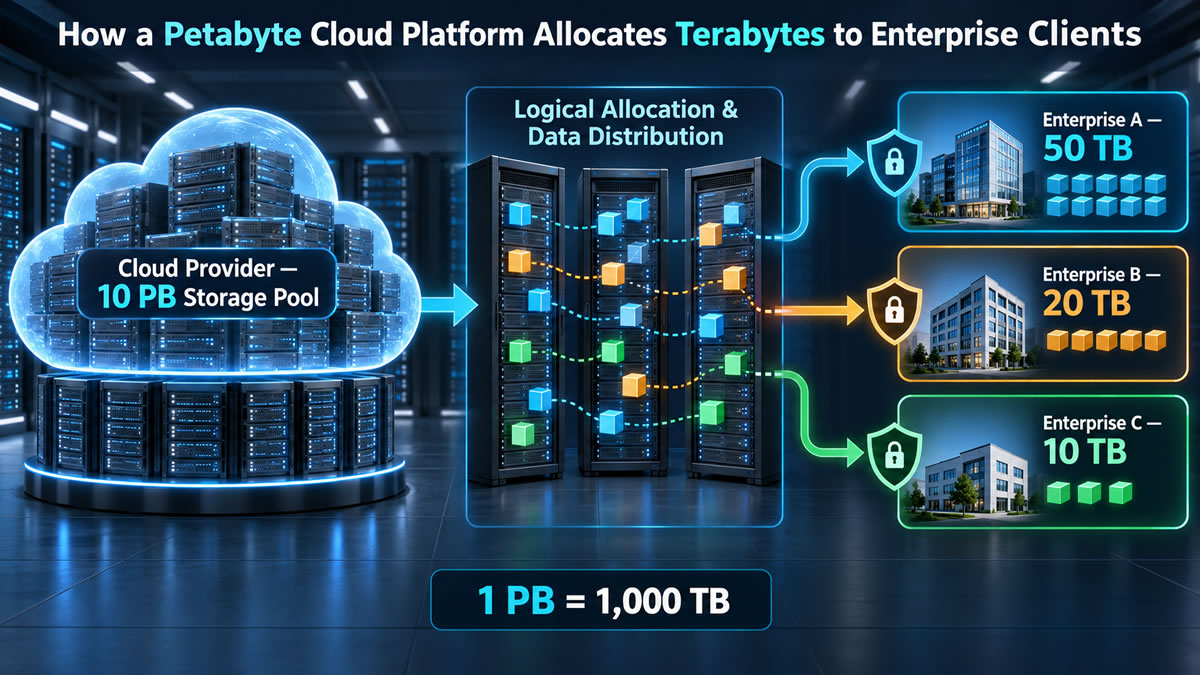
Example: Comparing 10 PB with 10 TB Allocations
Suppose a hypothetical cloud platform offers 10 PB of customer-usable logical capacity. Expressed in terabytes, that is:
10 PB × 1,000 = 10,000 TB
If that capacity were divided into fixed 10 TB portions, it would be equivalent to 1,000 portions. This is an illustrative conversion, not a prediction of how many customers a real provider can support — actual planning depends on whether the stated capacity represents raw hardware, usable storage, provisioned capacity or data currently consumed, covered in more detail below.
Cloud Storage Uses Pooled Resources
Cloud platforms combine computing, networking and storage resources so they can serve many customers and workloads. Users interact with a service interface while the provider manages the underlying equipment. The NIST definition of cloud computing describes it as on-demand access to a shared pool of configurable resources, provisioned and released with limited management effort — resource pooling, measured service and rapid elasticity among its essential characteristics. The provider operates the platform, while the customer remains responsible for data organisation, access permissions, retention settings and suitable use of the selected service.
Cloud Storage Can Be Presented in Different Ways
The phrase "50 TB of cloud storage" can refer to several types of service:
- Object storage keeps data as objects in buckets or containers, commonly accessed through an API.
- File storage presents shared directories and files through a network file-system protocol.
- Block storage provides virtual volumes that an operating system can format and use like disks.
These services may allocate and bill for storage differently — an object store might charge for the amount of data actually retained, while a file share or block volume might instead have a provisioned size, quota or service limit. Amazon's own S3 documentation states that a general-purpose bucket has no maximum total bucket size or limit on the number of objects stored in it, though account, request, object and service-specific restrictions can still apply — a striking contrast with a fixed-quota block volume, and a reminder that a single "cloud storage" concept can behave very differently depending on the service type.
Raw, Usable, Provisioned and Consumed Capacity Are Four Different Numbers
The total capacity printed on a provider's drives is raw capacity. Not every raw byte becomes storage available to customers, because the platform may need space for redundancy, metadata, maintenance and operational reserves.
- Raw capacity is the total advertised capacity of the installed storage devices.
- Usable capacity remains after protection and platform overhead.
- Provisioned capacity is assigned or made available to customer workloads.
- Consumed capacity is currently occupied by stored data.
Consider a deliberately simplified example in which three complete copies of a 50 TB dataset are maintained for protection:
50 TB × 3 = 150 TB
This illustrates the storage required for triplication — it doesn't mean every provider stores exactly three complete copies. A service may use replication, erasure coding or another protection design, and the overhead depends on its architecture and configuration.
Replication Is Not the Same as Backup
Replicas can help keep data available when hardware or infrastructure becomes unavailable. However, a live replication system may also copy an accidental deletion or damaging change to its other replicas — a backup instead preserves recoverable data from another point in time. Snapshots and object versions may also support recovery, but their independence, retention and deletion behaviour depend on their configuration. Microsoft's explanation of redundancy, replication and backup distinguishes live replicas from timestamped backup copies.
Some cloud services offer protection within one data centre, across availability zones, or across geographic regions — choices with different consequences for availability, latency, recovery time, data residency and cost. Geographic replication is not automatically included with every storage service or account; Microsoft documents locally redundant, zone-redundant and geographically redundant configurations in its Azure Storage redundancy guide , as one example of how these options are typically presented.
Customer Separation Is Usually Logical, Not Physical
Multiple customers can use a provider's broader infrastructure without receiving access to one another's information, through identity controls, authorisation rules, service boundaries, encryption and internal platform controls. This is logical isolation — it doesn't necessarily mean every organisation receives an exclusive storage server or dedicated set of physical drives; the precise physical arrangement is normally hidden behind the cloud service. Customers must still configure their own identities and permissions carefully, since provider-level isolation doesn't prevent an administrator from accidentally granting excessive access within the customer's own account.
Comparing PB Platforms with TB Workloads
| Platform capacity | Equivalent terabytes | Illustrative comparison |
|---|---|---|
| 1 PB | 1,000 TB | 100 portions of 10 TB |
| 5 PB | 5,000 TB | 100 portions of 50 TB |
| 10 PB | 10,000 TB | 1,000 portions of 10 TB |
| 25 PB | 25,000 TB | 500 portions of 50 TB |
These comparisons assume all listed capacity is available for the stated logical portions — they deliberately exclude redundancy, metadata, operational reserves and the difference between provisioned and consumed space covered above.