
A single organisation assigning a 256 GB virtual disk to each of 5,000 employees is, without anyone noticing, managing 1.28 petabytes of combined storage. Use the converter above for an instant PB-to-GB result, or the formula and chart below to work it out by hand.
Petabyte to Gigabyte Conversion Formula
This converter uses decimal data units, where peta represents 1015 and giga represents 109. Therefore, one petabyte contains one million gigabytes.
The conversion formula is:
1 PB = 1,000,000 GB
To convert petabytes to gigabytes, multiply the petabyte value by 1,000,000:
Gigabytes = Petabytes × 1,000,000
Example: Convert 2.5 PB to GB
2.5 PB × 1,000,000 = 2,500,000 GB
This conversion uses decimal byte-based factors: 1 PB = 1,000,000,000,000,000 B and 1 GB = 1,000,000,000 B. The decimal meanings of peta and giga follow the NIST definitions of metric prefixes . NIST also explains the distinction between decimal units such as PB and GB and binary units such as PiB and GiB in its guide to binary prefixes , where 1 PiB equals 1,048,576 GiB.
Petabyte to Gigabyte Chart
| Petabytes (PB) | Gigabytes (GB) |
|---|---|
| 0.001 PB | 1,000 GB |
| 0.005 PB | 5,000 GB |
| 0.01 PB | 10,000 GB |
| 0.025 PB | 25,000 GB |
| 0.05 PB | 50,000 GB |
| 0.1 PB | 100,000 GB |
| 0.25 PB | 250,000 GB |
| 0.5 PB | 500,000 GB |
| 0.75 PB | 750,000 GB |
| 1 PB | 1,000,000 GB |
| 1.024 PB | 1,024,000 GB |
| 2 PB | 2,000,000 GB |
| 5 PB | 5,000,000 GB |
| 10 PB | 10,000,000 GB |
How Petabytes of Capacity Can Be Divided Among GB-Sized Cloud PCs
One cloud-hosted PC may have a virtual disk measured in gigabytes, but a large organisation can operate thousands of virtual desktops. When the allocated disk sizes are added together, their combined provisioned capacity can reach the petabyte scale — a relationship that describes capacity in different units, but doesn't reveal how a cloud provider arranges, compresses, replicates or physically stores the data behind the service.
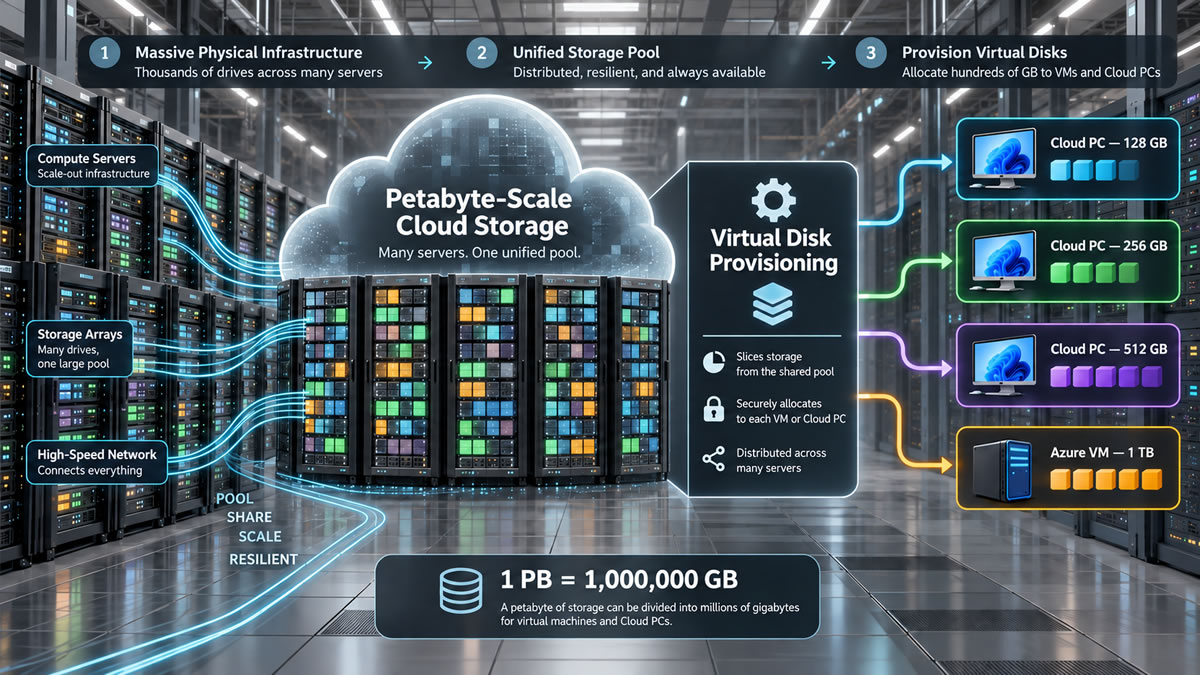
Example: Providing Cloud PCs to 5,000 Employees
Imagine that an organisation assigns a cloud-hosted PC with a 256 GB virtual disk to each of 5,000 employees. The combined provisioned capacity would be:
5,000 × 256 GB = 1,280,000 GB
Converted into petabytes:
1,280,000 GB ÷ 1,000,000 = 1.28 PB
Each employee sees a 256 GB disk, while the organisation manages subscriptions representing 1.28 PB of combined provisioned capacity — simply the sum of the smaller allocations. This example should not be interpreted as a measurement of the cloud provider's physical disk usage: the provider manages the supporting infrastructure, and the customer does not receive one directly controlled 1.28 PB storage pool.
What Is a Windows 365 Cloud PC?
Windows 365 is a cloud-based software-as-a-service product that creates Windows virtual machines called Cloud PCs, which users can access remotely from supported devices. Microsoft's Windows 365 overview describes a Cloud PC as an optimised and scalable virtual machine hosted by the Windows 365 service.
Windows 365 Enterprise, Business and Government generally assign a personal Cloud PC to one user; Windows 365 Flex has a different model, where multiple users can access the same Cloud PC at different times. Product editions and licensing rules should be checked before planning a deployment. The virtual disk appears inside Windows much like storage in an ordinary computer, but the employee is accessing a cloud-hosted virtual machine rather than a physical drive installed in the local device.
Windows 365 configurations combine virtual processors, memory and storage, and Microsoft currently documents examples ranging from smaller configurations with 64 GB or 128 GB of storage to specialised options with considerably larger disks — availability depends on edition, processor count, memory and workload type. Current examples and suggested workloads are listed in Microsoft's Cloud PC size recommendations . Product configurations can change, so administrators should consult current Microsoft documentation rather than relying on a permanently fixed list of disk sizes.
Windows 365 and Azure Virtual Machines Are Not Identical
Windows 365 uses Microsoft-managed cloud infrastructure and provides a managed desktop service; customers select Cloud PC configurations and manage user environments without designing every part of the underlying platform. A conventional Azure virtual machine is an infrastructure resource that gives the customer more direct control over the VM, attached disks, networking and surrounding architecture, with an operating-system disk and additional data disks subject to the limits of its VM and disk types. An organisation might use Windows 365 for employee desktops while using conventional Azure VMs for application servers, databases or specialised technical workloads — both involve virtual machines, but their licensing, management and storage models differ.
According to Microsoft, a Cloud PC's virtual disk, customer content and related storage reside in the Azure region where the Cloud PC is provisioned, so the selected region may matter for an organisation's data-location, governance and service requirements. Microsoft provides more detail in its Windows 365 privacy and customer-data documentation — organisations should assess their own contractual, regulatory and technical requirements rather than treating a unit conversion as compliance advice.
Provisioned Capacity Is Not Used Capacity
A user assigned a 256 GB Cloud PC may not fill the entire virtual disk; if the operating system, applications and user files occupy 80 GB, the rest remains available within that allocation. The calculation for 5,000 Cloud PCs therefore describes assigned disk sizes rather than the current volume of user-created data:
- Provisioned capacity is the total virtual disk capacity assigned to the Cloud PCs.
- Used capacity is the portion occupied by Windows, applications and user data.
- Available capacity is the portion of the virtual disks that users have not yet filled.
- Physical infrastructure consumption is an internal provider measurement that cannot be calculated from the virtual disk labels alone.
Resilience Is Separate from Capacity
Cloud services use resilience measures to reduce the effect of hardware and infrastructure failures, with the precise design depending on the service, region and selected features. Redundancy shouldn't automatically be treated as an independent backup — a backup strategy also needs suitable retention, recovery procedures, access controls and regular testing. Microsoft describes how supporting services contribute to availability in its Windows 365 service-resilience documentation , though this operational resilience is separate from the mathematical conversion between PB and GB.
How Many 256 GB Disks Equal One Petabyte?
As a unit exercise, one decimal petabyte can be compared with 256 GB allocations:
1,000,000 GB ÷ 256 GB = 3,906.25
Therefore, 3,906 complete allocations of 256 GB would provide 999,936 GB, leaving 64 GB — this is not a Windows 365 licensing limit or a description of Microsoft's physical storage architecture; it's simply a decimal comparison showing how thousands of GB-sized allocations can add up to a PB-scale total.
For example, 5,000 allocations of 128 GB represent 640,000 GB (0.64 PB), while 5,000 allocations of 256 GB represent 1,280,000 GB (1.28 PB) — a PB to GB Converter provides the mathematical relationship between these figures, without exposing a provider's internal architecture or replacing proper cost, licensing, performance and resilience planning.