
The first commercial CompactFlash cards, in the mid-1990s, held a few megabytes. A modern SDUC card can hold up to 128 terabytes — over ten million times more, in a package the same size or smaller. Use the converter above for an instant MB-to-TB result, or the formula below to work it out by hand.
Megabyte to Terabyte Formula
This converter uses decimal data units. The prefix mega represents 106, while tera represents 1012. Therefore, one terabyte contains one million megabytes:
1,000,000 MB = 1 TB
To convert megabytes to terabytes, divide the megabyte value by 1,000,000:
Terabytes = Megabytes ÷ 1,000,000
You can also multiply the megabyte value by 0.000001:
TB = MB × 0.000001
Example: Convert 2,500,000 MB to TB
2,500,000 MB ÷ 1,000,000 = 2.5 TB
This calculation uses the following decimal byte-based definitions:
- 1 MB = 1,000,000 bytes
- 1 TB = 1,000,000,000,000 bytes
The decimal meanings of mega and tera follow the NIST definitions of metric prefixes . NIST also explains why decimal units such as MB and TB are different from binary units such as MiB and TiB in its guide to binary prefixes , where 1 TiB equals 1,048,576 MiB.
Common Megabyte to Terabyte Values
| Megabytes | Terabytes |
|---|---|
| 1 MB | 0.000001 TB |
| 10 MB | 0.00001 TB |
| 100 MB | 0.0001 TB |
| 500 MB | 0.0005 TB |
| 1,000 MB | 0.001 TB |
| 10,000 MB | 0.01 TB |
| 25,000 MB | 0.025 TB |
| 50,000 MB | 0.05 TB |
| 100,000 MB | 0.1 TB |
| 250,000 MB | 0.25 TB |
| 500,000 MB | 0.5 TB |
| 750,000 MB | 0.75 TB |
| 1,000,000 MB | 1 TB |
| 2,000,000 MB | 2 TB |
| 5,000,000 MB | 5 TB |
How Memory Cards Grew from Megabytes to Terabytes
Memory cards once offered only a few megabytes of space. Today, cards with capacities measured in gigabytes and terabytes can fit inside cameras, recorders and other compact devices. That growth reflects improvements in flash-memory density as well as the introduction of new card standards and interfaces — though the relationship below is a capacity comparison only; it doesn't show whether two cards have the same speed, endurance or device compatibility.
What Is a Memory Card?
A memory card contains non-volatile semiconductor storage inside a small, removable package. It can retain photographs, videos and other files while disconnected from power and has no spinning platter or mechanical read head.
The term covers several different formats. SD and microSD are common in consumer devices, while CompactFlash and CFexpress have been used in photographic, video and industrial equipment. These formats can differ in size, connector design, communication protocol and performance.
From 8 MB to 1 TB
An early card labelled 8 MB and a modern card labelled 1 TB differ greatly in advertised decimal capacity:
1,000,000 MB ÷ 8 MB = 125,000
A 1 TB card therefore has 125,000 times the advertised decimal capacity of an 8 MB card. This is a capacity comparison only; it does not compare their transfer speeds or underlying technology.
Several Removable-Storage Formats Emerged
Flash cards became increasingly useful during the 1990s as digital cameras and portable electronics needed compact storage that could be removed and replaced. The CompactFlash Association was established in 1995, and CompactFlash later became familiar to photographers, while subsequent standards such as CFast and CFexpress introduced different interfaces and performance capabilities. The CompactFlash Association's history documents the organisation's formation and the development of its card standards.
Panasonic, SanDisk and Toshiba formed the SD Association in January 2000. As storage requirements increased, the SD family expanded into several capacity standards.
| Standard | Defined capacity range | Specified file-system family |
|---|---|---|
| SD | Up to 2 GB | FAT12 or FAT16 |
| SDHC | More than 2 GB and up to 32 GB | FAT32 |
| SDXC | More than 32 GB and up to 2 TB | exFAT |
| SDUC | More than 2 TB and up to 128 TB | exFAT |
These figures define ranges within the standards. They do not mean that every capacity is commercially available or that every host device can use the largest card in a range. See the SD Association's capacity guide for the current definitions.
How TransFlash Became microSD
Full-sized cards were too large for some mobile devices. SanDisk developed a smaller format originally known as TransFlash, which the SD Association adopted under the microSD name in 2005. The smaller form factor changed where removable storage could be installed, but it didn't create a new measurement system — a 512 MB microSD card and a 512 MB full-sized SD card have the same advertised decimal capacity, even though their dimensions and compatibility differ. The SD Association's history of microSD covers the format's development.
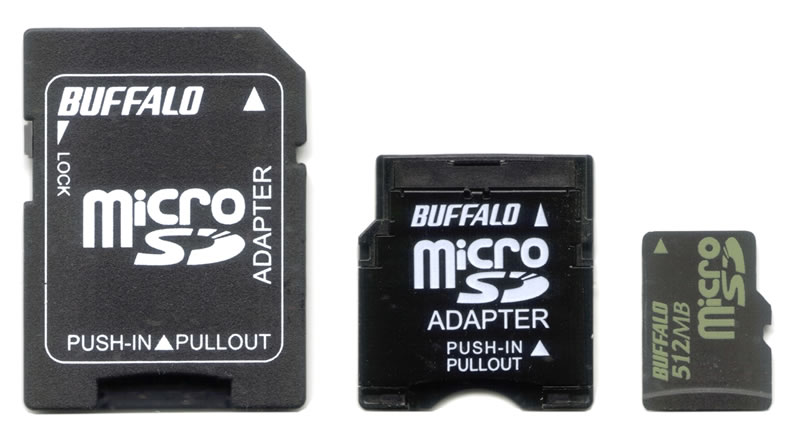
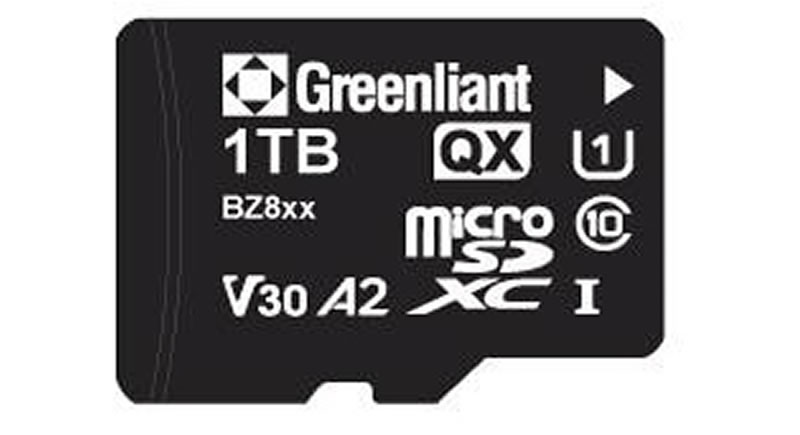
Comparing the 512 MB card with a 1 TB card:
1,000,000 MB ÷ 512 MB = 1,953.125
The 1 TB card has approximately 1,953 times the advertised decimal capacity of the 512 MB card.
Why the Available Capacity May Look Smaller
Card manufacturers generally advertise capacity with decimal units (1 MB = 1,000,000 bytes; 1 TB = 1,000,000,000,000 bytes), but binary units use different values (1 MiB = 1,048,576 bytes; 1 TiB = 1,099,511,627,776 bytes). Some operating systems calculate capacity using binary relationships while presenting labels that resemble decimal units. Formatting and file-system structures also consume some space, leaving less available for personal files than the raw advertised total. NIST explains the formal distinction in its guide to decimal and binary prefixes .
Capacity Is Only One Part of Choosing a Card
Memory cards are used in cameras, drones, dashcams, security cameras, audio recorders, handheld game systems and industrial equipment. These applications don't place the same demands on storage — a still camera may write individual photographs, while a video camera or dashcam must maintain a continuous data stream, and a device running applications from a card depends more heavily on random read and write performance. The number of megabytes or terabytes on the label can't show whether a card is fast enough for a particular workload.
What Do Speed-Class Symbols Mean?
SD Speed Class, UHS Speed Class and Video Speed Class symbols identify defined minimum write-performance categories:
- V30 identifies a 30 MB/s minimum sequential write class.
- V60 identifies a 60 MB/s minimum sequential write class.
- V90 identifies a 90 MB/s minimum sequential write class.
These classes are not promises of a card's speed in every situation — results can depend on the card, host device, interface, workload, temperature and file system. The SD Association's speed-class guide explains its Class, UHS, Video and SD Express markings.
A Card Can Fit but Still Be Incompatible
A card's physical fit doesn't guarantee that a device can use it — an older host designed for standard SD may not support an SDXC or SDUC card, its file system or its capacity range. Before buying a card, check the device manual for the supported card format, the maximum recognised capacity, the required speed or performance class, and any formatting instructions. Reformatting a card can erase its contents, so copy important files elsewhere first.
A Memory Card Should Not Be the Only Copy
A removable card can fail, become corrupted, suffer physical damage or disappear with the device carrying it, and its small size makes it easy to lose. Important photographs and recordings should be copied to at least one separate storage location — a memory card is best treated as capture or transport media rather than the sole permanent home of valuable files.