Convert milliamperes, commonly written as mA, to amperes. Both units measure electric current, and 1,000 milliamperes equal one ampere.
Milliampere to Ampere Formula
One milliampere is one-thousandth of an ampere:
1 mA = 0.001 A
To convert milliamperes to amperes, divide by 1,000:
Current in A = Current in mA ÷ 1,000
For example:
2,500 mA ÷ 1,000 = 2.5 A
Milliampere to Ampere Conversion Table
| Milliamperes (mA) | Amperes (A) |
|---|---|
| 1 mA | 0.001 A |
| 10 mA | 0.01 A |
| 50 mA | 0.05 A |
| 100 mA | 0.1 A |
| 250 mA | 0.25 A |
| 500 mA | 0.5 A |
| 1,000 mA | 1 A |
| 1,500 mA | 1.5 A |
| 2,000 mA | 2 A |
| 2,500 mA | 2.5 A |
| 5,000 mA | 5 A |
| 10,000 mA | 10 A |
How USB Power Grew from Milliamperes to Amperes
USB did not replace the milliampere with the ampere. Both units continue to measure electric current, and they remain exactly related:
1 A = 1,000 mA
What changed was the amount of electrical power that some USB connections could provide. Early computer ports were designed mainly for modest peripherals. Later charging specifications, USB Type-C and USB Power Delivery expanded USB to serve phones, tablets, displays, external drives and laptop computers.
As current values grew beyond 1,000 mA, manufacturers increasingly expressed them in amperes because 3 A is easier to read than 3,000 mA.
Early USB Power Was Intended for Computer Peripherals
USB originally joined data communication and limited electrical power in one connection. This was useful for keyboards, mice and other accessories that no longer required a separate power adapter.
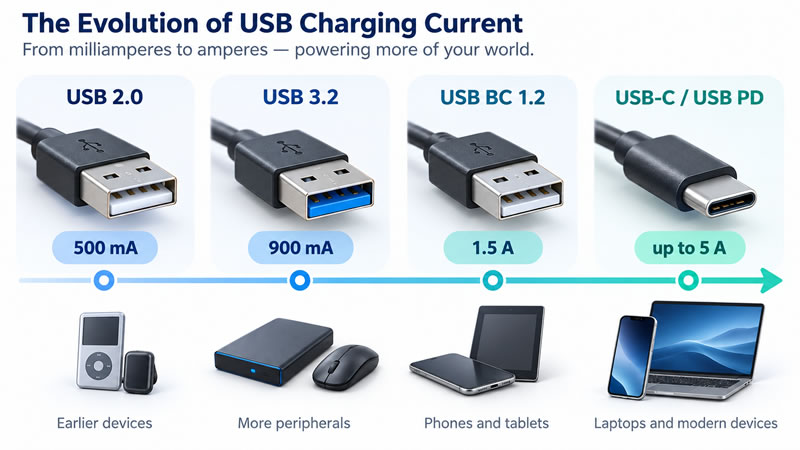
Under USB 2.0, a configured high-power device could be permitted to use up to 500 mA at 5 V. That maximum should not be treated as a guarantee that every USB 2.0 port supplied 500 mA in every state. Available current depended on device configuration, port behaviour and operating conditions.
At the commonly cited maximum:
500 mA = 0.5 A
Its nominal electrical power is:
5 V × 0.5 A = 2.5 W
This was adequate for numerous computer accessories but limited for quickly charging devices with increasingly large batteries.
Higher-Speed USB Added More Bus-Power Capacity
Later USB specifications increased the current available in particular configured operating modes. USB-IF's Type-C system overview summarizes default high-power values of:
- USB 2.0: 500 mA
- USB 3.2 single-lane operation: 900 mA
- USB 3.2 dual-lane operation: 1,500 mA
The 900 mA value equals 0.9 A, while 1,500 mA equals 1.5 A. These values describe defined USB operating modes, not the current that every connected device continuously consumes.
Battery Charging Addressed Dedicated Charging Uses
The USB Battery Charging specification addressed ports and adapters intended to charge batteries as well as provide ordinary USB connectivity. USB Battery Charging 1.2 is commonly associated with charging current of up to 1.5 A at 5 V.
That value can be written in either unit:
1.5 A = 1,500 mA
Battery Charging 1.2 should not be confused with USB 3.2 data speed or with USB Power Delivery. Data capability, connector type and charging protocol are related parts of a USB product, but one does not automatically determine all the others.
USB Type-C Can Advertise 1.5 A or 3 A at 5 V
USB Type-C introduced a reversible connector and configuration-channel pins that can communicate the current available from a source. Without establishing a USB Power Delivery contract, a Type-C source can advertise one of three general current levels:
- Default USB current for the applicable operating mode
- 1.5 A at 5 V
- 3 A at 5 V
A receiving device must monitor the advertised level and keep its consumption within the permitted amount. The presence of a USB-C connector alone does not guarantee 3 A charging or a particular data speed.
These current advertisements are described in the USB Type-C specification .
USB Power Delivery Negotiates Power Profiles
USB Power Delivery, commonly abbreviated to USB PD, goes beyond a fixed 5 V supply. A compatible source advertises its capabilities, and the receiving device requests a suitable power profile. The resulting agreement is often called a power contract.
USB PD can support current as high as 5 A, or 5,000 mA, when the source, receiving device and cable all support the required mode. A suitable electronically marked cable is required for USB PD operation above the standard 3 A cable range.
Modern USB PD increases power not only through higher current but also through higher voltage. USB-IF states that Extended Power Range can deliver up to 240 W using compatible USB-C equipment. At its highest fixed profile:
48 V × 5 A = 240 W
The USB Implementers Forum's USB Power Delivery overview describes the supported power levels and the role of flexible power negotiation.
Representative USB Current Levels
| USB power mode | Milliamperes | Amperes | Nominal voltage |
|---|---|---|---|
| USB 2.0 configured high-power mode | Up to 500 mA | Up to 0.5 A | 5 V |
| USB 3.2 single-lane default high-power mode | Up to 900 mA | Up to 0.9 A | 5 V |
| USB 3.2 dual-lane default high-power mode | Up to 1,500 mA | Up to 1.5 A | 5 V |
| USB Battery Charging 1.2 | Up to 1,500 mA | Up to 1.5 A | 5 V |
| USB Type-C 1.5 A current advertisement | Up to 1,500 mA | Up to 1.5 A | 5 V |
| USB Type-C 3 A current advertisement | Up to 3,000 mA | Up to 3 A | 5 V |
| USB Power Delivery with 5 A-capable equipment | Up to 5,000 mA | Up to 5 A | Negotiated |
These are selected maximum values under the stated modes, not a promise that every port with a particular connector or USB label supplies that current. Actual capability must be confirmed from the charger, device and cable specifications.
Why the Device Does Not Always Use the Maximum
The current advertised by a USB source establishes what is available under the active mode or power contract. It does not mean the receiving device consumes that maximum continuously.
Charging current can change with battery level, temperature, device activity and power-management decisions. A multi-port charger may also redistribute its available power when another device is connected.
If a phone and charger support different charging capabilities, they normally operate using a mutually supported mode rather than assuming the largest number printed on either product.
Why USB Now Appears to Use Amperes
The measurement system never changed. Five hundred milliamperes and 0.5 amperes have always represented the same current. The visible unit changed because the practical numbers became larger.
Early USB power values fitted naturally into the milliampere range. Modern charging profiles commonly reach 1.5 A, 3 A or 5 A, making amperes the more compact form. The change in labelling reflects USB's expansion from a peripheral connection into a flexible power system for mobile devices, displays and computers.