Convert radians to degrees when you need to express a mathematical or technical angle in a more familiar form.
π rad = 180°
Radians and Degrees Explained
Radians and degrees measure the same thing, but they use different scales. Degrees divide a complete turn into 360 parts. Radians measure an angle by comparing the length of a circular arc with the circle's radius.
- π/2 rad = 90°, or a quarter turn
- π rad = 180°, or a half turn
- 2π rad = 360°, or one complete turn
Radians are widely used in mathematics, physics, engineering and programming. Degrees are often easier to understand when describing a direction or physical rotation.
Radian to Degree Conversion Formula
One complete rotation contains 2π radians and 360 degrees:
2π rad = 360°
Dividing both sides by 2 gives:
π rad = 180°
To convert radians to degrees, multiply the radian value by 180 and divide by π:
Degrees = Radians × 180 ÷ π
For a quick decimal calculation, one radian is approximately 57.2958 degrees:
Degrees ≈ Radians × 57.2958
How to Convert Radians to Degrees
Use these steps for a radian value that contains π:
- Multiply the radian value by 180/π.
- Cancel π from the numerator and denominator.
- Simplify the remaining numbers.
Example: Convert 3π/4 Radians to Degrees
3π/4 × 180/π = 3 × 180 ÷ 4 = 135°
Example: Convert 2.4 Radians to Degrees
When the radian value does not contain π, use its decimal value in the formula:
2.4 × 180 ÷ π ≈ 137.51°
Converting Multiples of π
If the angle is written as a multiple of π, the conversion can be especially simple. Multiply the number in front of π by 180.
For example:
0.75π rad = 0.75 × 180° = 135°
For a fractional value, multiply the numerator by 180 and divide by the denominator:
5π/6 rad = 5 × 180 ÷ 6 = 150°
Radian to Degree Conversion Table
| Radians | Degrees |
|---|---|
| 0 rad | 0° |
| π/12 rad | 15° |
| π/6 rad | 30° |
| π/5 rad | 36° |
| π/4 rad | 45° |
| π/3 rad | 60° |
| π/2 rad | 90° |
| 2π/3 rad | 120° |
| 3π/4 rad | 135° |
| π rad | 180° |
| 3π/2 rad | 270° |
| 2π rad | 360° |
| 0.5 rad | 28.6479° |
| 1 rad | 57.2958° |
| 1.5 rad | 85.9437° |
| 2 rad | 114.5916° |
| 3 rad | 171.8873° |
Why a Map May Show Degrees While Its Calculations Use Radians
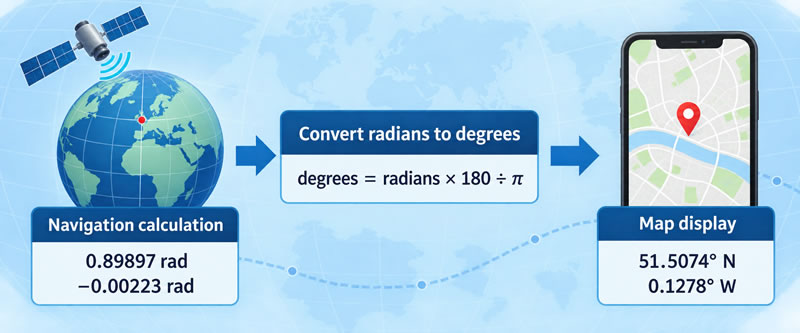
A navigation app might display a London location as 51.5074° N, 0.1278° W. These degree values are convenient for people to read, copy and share. Inside a distance calculation, however, the same coordinates may be represented in radians because many trigonometric functions are defined to accept radian arguments.
This does not mean that every map stores degrees and secretly replaces them with radians. Geographic software uses many data formats, coordinate reference systems and programming interfaces. Some functions require radians, some accept decimal degrees, and others work with projected coordinates measured in metres or feet. The software documentation determines whether a conversion is necessary.
Degrees Make Geographic Coordinates Easier to Read
Latitude describes a position north or south of the equator. Longitude describes a position east or west of a chosen reference meridian, normally the prime meridian for widely used global coordinate systems.
Their usual geographic ranges are:
- Latitude: 0° to 90° north or south
- Longitude: 0° to 180° east or west
Software frequently represents directions with signed values instead. North and east are normally positive, while south and west are negative. London's longitude can therefore be written as approximately −0.1278°.
Coordinates may appear in degrees, minutes and seconds:
51° 30′ 27″ N
Or they may be expressed in decimal degrees:
51.5075° N
Both formats describe approximately the same latitude. Decimal degrees are particularly convenient for databases, web forms and numerical calculations because the coordinate is stored as one signed number. ArcGIS documentation lists both decimal degrees and degrees-minutes-seconds among its supported coordinate notations .
Radians Connect an Angle Directly to a Circle
One radian is the central angle that intercepts an arc equal in length to the circle's radius. A complete revolution contains 2π radians, which is equivalent to 360 degrees.
This relationship makes radians convenient in formulas involving circles, angular separation and trigonometry. When latitude and longitude are supplied in degrees but a function expects radians, the conversion is:
Radians = degrees × π ÷ 180
For London's approximate latitude:
51.5074° × π ÷ 180 ≈ 0.898974 rad
Its western longitude becomes a small negative radian value:
−0.1278° × π ÷ 180 ≈ −0.002231 rad
Unit requirements vary between software tools. For example, scikit-learn's haversine-distance function expects latitude and longitude in radians. Other libraries accept decimal degrees and perform the conversion internally.
How Two Map Pins Become a Distance
Suppose an application needs the approximate surface distance between two map pins. Each pin supplies a latitude and longitude, giving four angular values altogether:
- Latitude of the first point
- Longitude of the first point
- Latitude of the second point
- Longitude of the second point
If the selected formula expects radians, the application converts those four values before calling the trigonometric functions. It can then use a spherical formula such as the haversine formula to find the central angle between the points.
Multiplying that angle by an assumed Earth radius produces an approximate great-circle distance:
Surface distance = Earth radius × central angle
This is the length of the shorter arc between the points on the assumed sphere. It is not automatically the length of a road, walking route or airline itinerary. Real routes must account for the available transport network, restricted areas and other practical constraints.
The Haversine Result Is an Approximation
The haversine formula treats Earth as a sphere. That model is suitable for many educational examples and approximate distance calculations, but Earth is more accurately represented by an oblate ellipsoid.
Applications that require greater accuracy—such as professional surveying, engineering or some geodetic work—may use an ellipsoidal model and an appropriate geodesic algorithm instead. The coordinate reference system and datum must also be known because identical-looking latitude and longitude values can refer to slightly different physical positions under different datums.
A Missing Conversion Can Produce a Plausible but Wrong Answer
Degree and radian values do not carry their unit inside an ordinary numeric variable. If a program sends 51.5074 to a function expecting radians, that function does not know that the programmer intended degrees. It simply interprets the number according to its documented input format.
The mistake may produce a result rather than an obvious error message,
which makes it especially difficult to notice. Clear variable names
such as latitudeDegrees and
latitudeRadians, range checks and tests using known
locations can help detect the problem.
Where Degree and Radian Conversion Appears
Degree-to-radian conversion is used in suitable mapping and navigation calculations, including approximate great-circle distance, initial bearing, destination-point and spherical-geometry calculations. Similar conversions appear in aviation, marine navigation, astronomy, weather mapping and geographic analysis.
Radian-to-degree conversion is used when an internally calculated angle must be presented as a familiar bearing or geographic coordinate. For example, software may calculate a direction in radians and then display it to the user as a bearing between 0° and 360°.
The important distinction is not simply that maps use degrees while computers use radians. The correct rule is to identify the unit required at every interface, convert only when necessary and retain information about the coordinate system used.